

HOW TO CHANGE WALLPAPERS IN ANDROID AUTOMATICALLY
First of all download this app on your android phone or tablet from android market – Automatic Wallpaper Changer 3

Now install it on your phone or tablet
STEP 3.
Open the app and select the wallpaper to play in slideshow.

*ENJOY & WAIT FOR NEXT* ;)
SEND AUTOMATIC MESSAGES ON WHATSAPP
SEND AUTOMATIC MESSAGES ON WHATSAPP
This post is show you, how can you send automatic messages on whatsapp. Is it easy to do ? Of course yes. No doubt , I always share very simple methods for doing complex work in very simple language. Schedule whatsapp message useful to us many times. e.g. Its your friends birthday & you want to wish at 12′o clock, then just schedule the message and go to sleep. Make your life easy and relax. Here are some steps for this trick, given below. Just read and follow carefully..
STEP 1:
First of all , you should have a rooted android phone. [How To Root Your Android]
STEP 2:
Now download and install WhatsAuto Messages App from playstore.

STEP 3:
You will get a better UI to use this APP and schedule your messages.
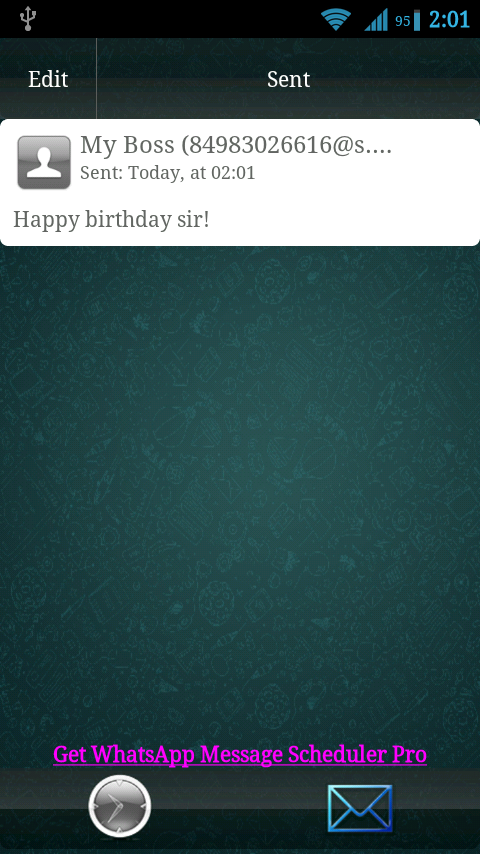
So just go for it.
Thanks for reading, now its time to share this post with your friends. You can also like my Facebook page to get latest updates.
TYPE IN HINDI IN ANDROID
Hey friends today I am going to share how to type in hindi on android. This is very easy to write on your android phone. If you are thinking that I am going to share any hindi language keyboard then you are wrong. It is something more than a hindi language keyboard. It is google input tool which allow to automatically convert your hinglish words in hindi language. You have to read this post to know more about this trick. Here are some steps given below just read and follow them carefully..
STEP 1:
Download Google Hindi Input from play store.
Download
STEP 2:
Enable this tool by following this. Settings -> Language & Input, under “KEYBOARD & INPUT METHODS” section, check Google Hindi Input, then click Default and select “Hindi transliteration” in the “Choose input method” dialog.
google hindi input (1)
google hindi input (2)
STEP 3:
Language swapper will appear on your keyboard as shown in below screenshot.Touch on that to swap from English to Hindi.
google input hindi
STEP 4:
Type anything in hinglish e.g. “Aur Btao Kuchh Navi Taazi “
STEP 5:
It will automatically converted into Hindi as shown in below screenshot.
google hindi input (4)
NOTE :
Please note that this will work with default keyboard only. i.e will not work with swiftkey,
HOW TO SEND FILES OVER WIFI
Now no more need of data cables or any slow Bluetooth connection. You can easily send files over WiFi from your phone to your laptop or computer. It is very easy to do also very useful. But there are some basic requirements which you have to fulfill otherwise this post is just wastage of time. Don’t worry , you don’t have to compile any huge program to work on this trick. Here are some easy steps are given below, just read and follow them carefully,In case of any problem your can leave your comment below to get fastest help…
First of all you should have below thing
1. A WiFi Internet Modem or You can make your laptop WiFi Hot-spot using this trick.
2. Android phone or tablet
3. Obviously a computer or laptop
Now just follow these steps.
STEP 1:
First of all connect your phone with WiFi.
STEP 2:
Now just download WiFi File Transfer from Google Play Store.
STEP 3:
Now just run the downloaded app. Here you will see on option to start service. Just touch on that.
wifi file transfer
STEP 4:
Now this will generate an unique ftp address in this format – ftp://ip-adress:port as shown in below screenshot.
wifi file transfer 2
STEP 5:
Now open My Computer in your computer of laptop. Here just fill the the ftp address in address bar as shown in below screenshot.
wifi file transfer 3
STEP 6:
Now you will see that you file manager of your phone in your computer. Please note that there is no need of internet connection in this. You should have only WiFi connection in both device.
COLLECTION OF TOP ANDROID KEYBOARDS
Hey friends, if you own a Android, you know that a good keyboard is a must. And, the stock android keyboard do not provide good performance. Thanks to custom keyboards this problem
can be solved by custom keyboards, here is the list of some best Android keyboards we know:

This is something which provide accurate predictions most of the time, provides slide typing ( like swype) and also learns from what you have typed in the past, must give it a try.

As the name sounds, it allow you to do typing just by swipes. But don`t under-estimate this as the world record for the fastest typing was made using this keyboard.
This keyboard also has some cool features including the given above, but it provides lots of customization themes, non-qwerty keypad, a large language support.

It has 70+ language support, has swipe to type feature and looks cool if you like different colors, it provide a lot of skins and is relly good alternative to stock android keyboard.
HOW TO SHUT DOWN PC IN 2 SECS
There are only three steps. Just proceed as follows-


HOW TO MAKE IDM GENIUNE
In our previous post we enlisted some software that would make your life easy. In that list we mentioned a software called IDM that is not freeware. We have found a way to make it free for everyone. Yep, we have found a way to patch IDM the genuine way.
So, here are the steps:
- Firstly download the latest version of IDM and install it.
- Now search for Notepad and Right Click> Run As Administrator

- In file menu, Click Open.
- In the dialog, Navigate to Windows Drive(Mine is C:)>Windows>System32>drivers>etc and open the file named hosts. Now paste the following lines in it:
127.0.0.1 tonec.com127.0.0.1 www.tonec.com127.0.0.1 registeridm.com127.0.0.1 www.registeridm.com127.0.0.1 secure.registeridm.com127.0.0.1 internetdownloadmanager.com127.0.0.1 www.internetdownloadmanager.com127.0.0.1 secure.internetdownloadmanager.com127.0.0.1 mirror.internetdownloadmanager.com127.0.0.1 mirror2.internetdownloadmanager.com

- Now save the file and close it.
- Now go to tray icon of idm in tray and click it, and it`s windows open up like this. Now go to Registration Menu and click Registration. Now use any of the keys given below:
RLDGN-OV9WU-5W589-6VZH1HUDWE-UO689-6D27B-YM28MUK3DV-E0MNW-MLQYX-GENA1398ND-QNAGY-CMMZU-ZPI39GZLJY-X50S3-0S20D-NFRF9W3J5U-8U66N-D0B9M-54SLMEC0Q6-QN7UH-5S3JB-YZMEKUVQW0-X54FE-QW35Q-SNZF5FJJTJ-J0FLF-QCVBK-A287M
- Click OK and you are done! IDM is registered now.
GET FREE ONLINE RECHARGE WORLDWIDE
Hello friends, as I have already posted a trick for free recharge i.e HOW TO GET 100% FREE ONLINE RECHARGE & today I have one more trick for free online recharge. This method of online recharge is very easy & fast than before. Here is one more website which is giving free recharge to their users for completing surveys on internet. So if you want to get free recharge then here are some simple steps, just follow them and get your free recharge now….
STEP 1:-
First of all visit to mCent & create a free account now.

STEP 2:-
Verify Your Email Id & Phone Number

STEP 3:-
Now just participate in free contest and win recharge of Rs.250 to Rs.1000 every week.
PROOF

WHAT IS NEED OF ROOTING IN ANDROID ?
WHAT IS NEED OF ROOTING IN ANDROID ?
Hi guys, I think you should read this post before rooting your android phone or tablet. If you are an android user then you heard ROOT term many times but what is the actual meaning of rooting. Ok, So lets start the discussion about Rooting and its advantages and disadvantages. WHAT IS ANDROID ROOTING?
OK let me tell you. Friends Superuser is the special type of user account in an operating system used for system administration. In Android superuser is also known as ROOT.
 - Rooting Help to gain the power of superuser.
- User can customize his device according to his wish
- Rooting helps the user to Free Up device memory, User can directly install the apps on his SD Card
- Rooting Help the user to customize phone performance.
- Rooting Allow the user to install custom ROM
DISADVANTAGES OF ROOTING?
 -
It breaks device warranty immediately, User can not complaint to his
device manufacturer for any error after rooting his phone.
-
It breaks device warranty immediately, User can not complaint to his
device manufacturer for any error after rooting his phone.- Rooting decreases device life.
- Danger of viruses or malwares increased after rooting
- It involves the Risk of Phone BRICKING.
SPEED UP INSTALLATIONS WITH JUST ONE CLICK INSTALLER !!!
Nowadays we come across situations that we have to format our PC and have to search every bit of software (with new version, of course) and waste a lot of time in only one job. We have collected some
news that would make your way easy with website that provide direct installer which include apps of you choice.
Ninite is an option website. This one is more preferable as it have large no of software options and thus providing a more customisable installer.

CHECK YOUR AIRTEL NUMBER
Hello Airtel user,Here i have a trick for you.If you have forgot your number and have no balance or free sms to check your number then I have a code for you

CHECK YOUR VODAFONE NUMBER

STEP 1:
First of all open dial-pad of your phone.
STEP 2:
Now dial this number *111*2# from your vodafone number,
EASILY SOMEONE CAN ACCESS YOUR MCENT ACCOUNT
Friends, I hope you all know about Mcent. Mcent is one and only website on internet which is giving huge amount of free recharges to their users. You can read this post to know how to get free recharge using mcent. But today I am going to share how easily someone can stole your mcent account's password. Here are some steps which will clear this concept.
STEP 1
Suppose I want to hack your mcent account. Now First of all I should have in your contact so that you can do that which I want from you.
STEP 2.
Secondly I need a mobile number which is not registered on mcent. Now I will ask you to add my number to your mcent account.

STEP 3.
Ok, now you will add my number to your account to give me a little amount of free recharge from your account because I am your friend.
STEP 4.
Now the Hack start, I will go to Forget Password page and enter my number which you added in step 2 to reset your password and you will not happy to know that mcent will send me reset code to reset your account password on my mobile number. So this way I will hack your mcent account and use your airtime to get free recharge.

SECRET BEHIND THIS:
So friends, what is the secret behind this hack. The secret is that when you add any new number to your account then mcent assumes that added number as your new number and it also gives admin access to that number, means you can use new added numer to recover your password.
HOW TO SAVE YOURSELF:
One and only way to save yourself from this hack is that do not add any number [which is not your] to your account. Same hack can be done using email id so also do not add unknown email ids to your account.
STEP 1.
First of all open IDM and click on GRABBER as shown in below screenshot.

Now below type of screen will come in front of you, Here just fill
1. Project name (e.g. Way2Hacking)
2. Website URL (e.g. http://way2hacking.com or any other website which you love to download)
3. Choose Project Template (I will recommend you to choose " Complete Start Page with all picture, styles and scripts for offline browsing " if you want to browse your favorite website offline)

STEP 3.
That's It, I hope you have done above steps. Now just click on NEXT and choose the folder in which you want to save the website.

STEP 4.
Again click on NEXT to choose which part of websites you want to ignore or download e.g Pop-Up etc.

STEP 5.
Again Click on NEXT and done. Your website will be started for download. Now just wait for some time until your download is not completed after that enjoy offline browsing .

NOTE:-
FRIENDS, LET ME SUGGEST YOU SOMETHING. PLEASE DO NOT FULL YOUR HARD DRIVE BY DOWNLOADING EVERY WEBSITE BECAUSE DOWNLOADED WEBSITES ARE LIKE OLD NEWSPAPER WHICH ARE USED ONLY TO SERVE BREAD PAKORA IN INDIA.
SEE OLD LOOK OF ANY WEBSITE
Hi friends,welcome back to way2hacking - a tech blog. As you know , everything changes with time - websites also. Now if someone ask you that do you know how a website looked before? Then what's your answer? Yes or no? If no then just read this complete post it will turn your answer into yes. Here is a solution to see old look of any website. I will tell you step by step procedure. In case of any doubt or problem you can comment below to get fast solution. Okay, Lets start the post ..
STEP 1:
First of all decide which website you want to see in its old look
STEP 2:
Now just open - WayBackMachine. This is website which will help you to see old look of any website.
STEP 3:
That's it. Now you have to just enter website name. [e.g. www.way2hacking.com]

Now you will get a screen as shown in screenshot. Now just select the date in which you want to see website look

WEBSITES FOR ENGINEERING STUDENTS

HOW TO VIEW BROWSER HISTORY IN BEAUTIFIED WAY
Hello dear W2H readers. After a very long time, I am once again here with an awesome post. In today's world everything is smart e.g You , your phone, your tablet etc. But do you know that your browser also can be smart like you or your phone. We have to just add an extension to it to make it smarter. OK today I am going to share one more smart extension for your Google chrome as before. Let me tell you what is this extension for. If you will install this extension then it will beautify your browser history in smarter way as shown in below screenshot. OK now let me tell you how can you achieve this extension. You have to just read and follow given steps to make it possible.
First of all visit to www.cottontracks.com & install extension for your browser. Chrome Or Opera as mentioned on website.

Now after Installing this extension you will get below type of icon in your browser in extension bar as shown in below screenshot.

STEP 3:
Now just click on that , you will see an awesome interface of your search history. This extension helps your browser to categorized browser history in beautiful way with story lines. So just go for it.
ANDROID APPS FOR STUDENTS
Android is really an awesome operating system by GOOGLE. But why Android is awesome. Ya you are right. Its android android market with tons of apps. Android is awesome because of its application as well as user friendly interface. Android is an open source software(OSS) which allows developers to develop new & new useful apps daily. I am agree there are many apps in android market which are of no use but there is also tons of useful apps. So today I am going to share some android apps which are helpful to all students. Have a look on these apps and also share with your online friends.
 TOP+10+ANDROID+APPS+FOR+STUDENTS
1. WikiPedia
Wikipedia is the free encyclopedia containing more than 20 million articles in 280 languages, and is the most comprehensive and widely used reference work humans have ever compiled.
2. Google Translate
Google Translate is an official translator by Google inc. It help students to translate text between more that 70 Languages. Also have some cool features like speech to text recognize, camera to text recognize, free hand text recognize etc.
3. Google Currents
Google Currents delivers beautiful magazine-like editions to your tablet and smartphone for high speed and offline reading.
4. Dictionary.com
The #1 FREE English dictionary app for Android since 2010—with over 2,000,000 definitions and synonyms from Dictionary.com & Thesaurus.com!
5. NewsHunt : India News | Jobs
NewsHunt, India's #1 mobile newspaper app brings together the News from 80+ regional newspapers in 11 languages, and the best Jobs from India. ‘NewsHunt : India News | Jobs' is free and is used every day by millions of users around the world.
6. Any.do To-do List & Task List
Millions use Any.do every day to remember all the tasks they want to-do and make sure they get them done. Key benefits: Seamless cloud sync, Speech recognition, Alerts, Any.do Moment, Snooze tasks, Google Task Sync, Notes, Sub tasks, Amazing Widgets, Repeating / Recurring Tasks, Missed call, Auto complete, In app actions, Gesture support & much more!
7. CamScanner HD - Scanner, Fax
CamScanner HD turns your tablet into a scanner. With CamScanner, you are able to digitize any paper documents by photo shooting. Simply take a picture of any paper documents such as receipts, agreements, notes, whiteboards and so forth, and CamScanner can auto-crop image, enhance image quality and create an industry standard PDF file. You can easily share the scanned documents via Email, Google Cloud Print, and fax, upload them to cloud like Dropbox, Google Docs, Box.net, and manage them by grouping or searching.
8. WolframAlpha
Remember the Star Trek computer? It's finally happening--with Wolfram|Alpha. Building on 25 years of development led by Stephen Wolfram, Wolfram|Alpha has rapidly become the world's definitive source for instant expert knowledge and computation.
9. My Class Schedule: Timetable
My Class Schedule keeps your student life organized!This app will not only keep you informed about your upcoming classes, but also reminds you of exams and unfinished homework.The main feature of My Class Schedule is its timetable that shows your schedule for any particular day or week. Additionally there are many other helpful features, for example a grade overview with your average grades or the ability to automatically mute your phone during class.No matter if you go to school or university, this easy to use app helps you to keep track of all related tasks.
10. Studious
With Studious, your phone will never embarrass you in class again by going off. Forgetting about homework and tests will be a thing of the past.
Thanks to Developer To develop such best & useful apps for us.
WEB BROWSER AS CALCULATOR
USE YOUR WEB BROWSER AS CALCULATOR
Hello friends , Want to use calculator in your web browser. If yes then this post of mine is only for you. Today I will show you how to use web browser as calculator. No doubt , I have already shared how to use web browser as notepad. I have already shred lots of posts on chrome and firefox tips & tricks. Recently I have made social media follow page for our users. You can check this page here and also you can follow us on different different social media websites to get latest update from way2hacking. Okay now have a look to see how can you use your browser as calculator.So first of all you have to open console of your browser.
1. Chrome
- Just press CTRL + SHIFT + J to open console in chrome.
- Now just type your calculation to get result.
- Just press CTRL + SHIFT + J to open console in Firefox.
- Now just type your calculation to get result.
3. Opera
- Just press CTRL + SHIFT + I open console in
Opera.
- Now just type your calculation to get result.
DEMO:


